 Download CV




 389
389THE MISSION
As the sole UI/UX Designer, I turned a working Unreal Engine prototype into a game that looks and reads like ancient Greece. The Last King is three games in one: open-world survival, a city to rebuild, and an army to recruit, train and command in battle. In three months I designed the interface that holds them together: the main menu and loading screen, the HUD, the command wheel, character and equipment, crafting, training and building mode, plus the design system the developers built it all from. The rule behind every screen: the player is a soldier in the fight and the king giving orders at the same time, so everything has to read at a glance.
STORY OF THE PROJECT
You start with nothing: a razed city, a broken army, and Persian forces holding the villages around you. You gather resources, craft weapons, build walls and camps, recruit soldiers, train them and lead them into battle. When I joined, every one of those systems already worked in the developers' prototype, but the interface was a set of engine placeholders: white boxes, red debug labels and body-part names written where the gear should go. Each system wanted the player's whole attention, and on screen they fought for it. I gave each system its own mode instead of stacking them: a command wheel for orders, one equipment view per soldier, a crafting card that reads like an item, and a builder mode that says why something can't be placed. The goal was for the player to feel like a commander, not a bookkeeper.
UI BREAKDOWN
The whole interface on one map: seven areas branching off the game, and the screens and widgets inside each. It set the scope for every screen that followed.
- Start Game
- Load Game
- Settings
- Credits
- Exit Game
- In-Game HUD
- Health Bar
- Stamina Bar
- Objective/Quests
- Mode manager
- Resume
- Save Game
- Settings
- Quit to Main Menu
- Inventory System
- Inventory Grid
- Item Tooltip
- Card about Item Info
- Stats about Player
- Navigation bar
- Settings and Options
- Sound Manager
- Visual Manager
- Key Binds
- Gameplay Manager
- Development Team
VISUAL DIRECTION
The game's systems were already running. What it didn't have was a face.
// THE PAIN
The developers' prototype was built from engine defaults: white boxes, a default font, red debug labels and slot names like “left forearm” written where the armor should go. It worked for testing, but it looked like a tool, not a game set in ancient Greece. Nothing on screen told the player what mattered most.
// THE SOLUTION
I set the look on ancient Greece without letting it get in the way. The frames carry the history: worn stone and leather textures, bronze outlines, and the Greek key pattern on the main menu and loading screen. The data stays clean: dark, warm panels so the world remains the brightest thing on screen, one light-blue color for whatever is active or clickable, and red kept for danger and losses. Loading screens show a quote from the game's world, so the wait still tells the story.
COMMAND MANAGER
In The Last King the player is one soldier in the battle and the commander of the whole army at the same time.
// The job to be done
JTBDWhenI'm in the middle of a battle,
I want togive my army an order instantly,
SoI stay in control of the fight.
// THE PAIN
The game runs in real time, and menus don't pause it. Commands sat in one crowded panel, nested orders took several clicks, and players could be killed while searching for the right key.
// THE PROCESS
I mapped the player's path from spotting a threat to issuing an order, sketched options to shorten it, and tested each version with the community focus group on Discord.
// THE SOLUTION
I rebuilt the menu like an abacus: every command has a fixed position, so players learn it instead of searching.
- Two keys, one order. The first number picks the group, the second the action. For example, 2 then 2 sends troops to attack.
- Six commands with sub-commands: Army Command, Formations, Player Mode, Squads, Tactics and Army Mode, each opening its own set on the outer ring.
- Keyboard and mouse, with the same structure for both.
- Built for muscle memory. Experienced players give orders without looking at the menu.
- The selected sub-command is named above the wheel (“Mining Mode”), so the player always knows what they just chose
- A hotbar under the wheel repeats the current set, so the same number keys work without opening it
- Key hints in the corner change with the mode: Move squad, Select unit, Create new squad
// THE RESULT
The wheel shipped in the game. In the release it opens with the mouse scroll wheel, and a tutorial popup teaches it the first time the player needs it: open the wheel, pick Constructor mode, place the hologram while it's green, and build.
CHARACTER AND EQUIPMENT
Every soldier in the army can be levelled, trained and equipped, and so can the player.
// THE PAIN
In the prototype, equipping a soldier meant reading two panels at once: a grid of boxes named after body parts (head, left shoulder, right calf) and a separate inventory grid below. Stats were a column of identical bars, so there was no way to tell whether a new sword made a soldier better or worse until after it was equipped.
// THE SOLUTION
I redesigned it as one equipment view. The soldier's 3D model stands in the middle, with each gear slot placed on the body where the gear is worn, so the player sees the loadout instead of reading it. Items are dragged from the list straight onto the model.
- Stats on the left, the model in the middle, the items list on the right: the whole decision on one screen
- Stat change previews: gains show in green and losses in red next to each stat before the player saves
- Character and Soldier tabs, and arrows to step through soldiers without closing the screen
- Skill points spent with + and −, confirmed with one Save Changes button
- Auto Equipment for all soldiers, with a tooltip explaining how it picks the best gear
CRAFTING
Before redesigning crafting, I mapped what the prototype already did.
// THE PAIN
The prototype's crafting screen listed every weapon in one long list with tiny resource icons, and printed each item's stats as raw text (“Can cut off limbs? : true”). Sorting and the menu tabs were rows of unlabelled squares along the edge. I marked up a recording of it to show the team which controls did what before changing anything.
// THE SOLUTION
The first version of the new crafting screen reads like an item card. The list on the left stays short and sortable; the card on the right leads with the item's picture and name, puts the five stats that matter in combat on one highlighted band, lists the rest as plain Yes or No, and spells out the recipe in words and numbers. Craft is the one light-blue button on the screen.
TRAINING
Recruits don't start as warriors. The player trains them at a training base, using training dummies.
// THE PAIN
The prototype's training widget was a list of soldiers with sixteen identical stat bars each, next to an empty white square marked “Vacant”. The developers labelled the recording “will need explanation”, and a player would have needed one too.
// THE SOLUTION
I turned it into a choice between three training modes, Archer, Spearman and Swordsman, each an illustrated card showing how many new recruits and upgrades are waiting and how many dummies are free. The selected card gets a bronze frame. A mode with no free dummy turns grey and says so in red, so the player knows why it's blocked before pressing Start Training.
// THE RESULT
Picking a mode opens its training page. The soldiers list on the left counts who is new, who can be upgraded, who is already training and how many dummies are empty, with trait tags on every soldier. The selected soldier's stats sit on the right, with the skill points each session earns, above one button that reads Start Training or Stop Training. Stopping asks first, because the soldier would lose their progress.
BUILDER MODE
Building happens out in the open world, with soldiers around and enemies nearby.
// THE PAIN
A builder has to answer three questions at once: what am I holding, where can it go, and if it can't go there, why not? Without the last answer, a red ghost on the ground just looks like a bug.
// THE SOLUTION
Builder mode is its own mode, with everything the player needs around the edges and the world left clear in the middle.
- Construction parts in a paged grid, turned with Q and E, each part with its own key
- Quick slots under the character on Z, X, C, V and B, with the held part named above them
- An invalid placement turns red and a note says why in plain words: “Can't place the Ladder. Create Wall first.”
- Key hints in the corner: Build, Rotate, Tear Down and Build Mode
DESIGN SYSTEM
I built the design system so a small team could put 20+ screens into Unreal Engine without redrawing a single panel.
// THE PAIN
Every screen of the prototype used engine defaults, and each new system added its own. There was no shared palette, type scale or icon style, and textured fantasy panels are hard to reuse: stretch one to a new size and its worn edges distort.
// THE SOLUTION
One Figma library as the single source for every screen, prepared for how Unreal builds UI.
- A palette by role. Raisin Black and Chinese Black for surfaces, bronze for outlines and labels, warm neutrals for text, and vivid colors kept for status only: Coquelicot for errors and losses, Ochre for warnings, Middle Green for gains, Light Blue for whatever is active.
- Type by role. Ringbearer sets the display titles, Prata the subtitles, and Inter everything the player reads fast: labels, stats and body text, on a 14/20 and 18/24 scale.
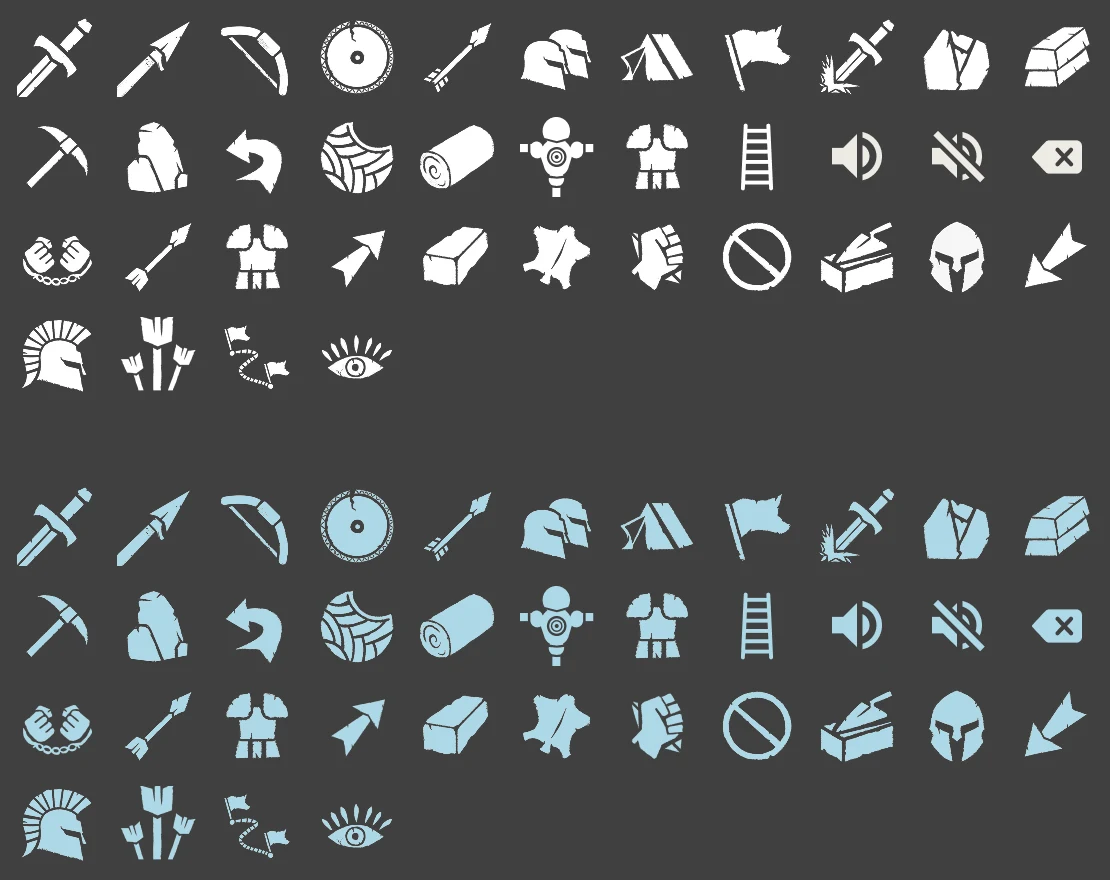
- 50+ icons in two states. Weapons, armor, resources, commands and system icons in one hand-drawn style, each in Alabaster by default and Light Blue when active.
- 9-slice ready. Panels, frames and buttons were delivered as 9-slice assets, so the developers could stretch them to any size in Unreal without distorting their corners.
The Last King UI Kit
Tokens from the Figma library
// 01 Palette
Dark, warm surfaces so the world stays the brightest thing on screen; vivid colors are kept for status
Surfaces
Status
Neutrals
// 02 Typography
Three faces, four roles: an ancient display face for titles, a classical serif for subtitles, a clean sans for everything the player reads fast
- Ringbearer Medium128px · Display headings
- Prata Regular48px · Subtitles
Training Base
- Inter Semi Bold18/24 · UI labels
Construction Parts · Items List
- Inter Regular14/20 · Body text and numbers
Automatically equips optimal gear for each soldier based on their attributes and combat role.
// 03 Components
Rebuilt from the screens: one light-blue action per screen, and stat changes previewed before they're saved
Buttons
Stat preview
Gains show in green, losses in red, before the player presses Save Changes.
// 04 Icons
One hand-drawn set, 50+ icons, each in two states: Alabaster by default, Light Blue when active
IN THE GAME
The UI shipped in the game: the objectives tracker, the health bar, the hotbar and key hints on the HUD, the command wheel and formations in the field, and the “You have been spotted” warning when an enemy sees the player.
SCOPE AND RESULTS
In three months, from June to August 2023, I delivered 20+ screens, 50+ icons, a typography system and a Figma design system with 9-slice-ready assets: main menu, loading screen, HUD, command wheel, character and equipment, crafting, training and builder mode. The developers built the game from it, and The Last King was released in Steam Early Access in 2025.
// CORE UI/UX HIGHLIGHTS
- Ergonomic HUD and systems. HUD layouts built for combat clarity, keeping health, stamina and objectives readable in the middle of a fight.
- Radial navigation and menus. Radial selection menus for quick weapon, tool and command switching, so every choice is a couple of inputs away instead of a trip into a menu.
- Iconography and visual language. One unified, scalable icon set, so players read what they're holding and what's active at a glance during real-time action.

Excellent UI designer to work with, helped me out build UI for my game from scratch. Went above and beyond in terms of research and finding inspirations from other media. 10/10 would work with again.

- Appreciations
- 389
- Views
- 6,047